Getting started
How the platform works
The rules behind your numbers
The rules behind your numbers: how every number in the dashboard is calculated, and why some show “Not measured”.
Open the page in the dashboardWhat this page is
“How the platform works” collects the rules behind your numbers and automations, written the way the code actually works: when a cart counts as open, how we know two customers are the same person, and why a number shows empty rather than zero.
It's read-only — there's no task to finish here. Each topic opens with a click and ends with a link to the page it talks about.
The six topics and when to open each
Abandoned carts
- What it is
- Carts are read from your platform every hour. A visitor's cart with no phone or email closes after 3 days without an update; a known shopper's after 14 days.
- When to use it
- When our cart count differs from your platform's.
- How to start
- Open the first topic, then “Carts page”.
Customers
- What it is
- A customer's identity is their mobile number, or their email if there's no number. The same person on two channels is merged into one profile when the number or email matches.
- When to use it
- When you see a duplicate customer or wonder where one came from.
- How to start
- Open the topic, then “Customers page”.
Syncing with your store's platform
- What it is
- Automatically every hour, and with the “Sync now” button. Each sync is a full pull, and a product that disappears from the store is archived, not deleted.
- When to use it
- When a new product or order doesn't show up.
- How to start
- Open the topic, then “Sync health”.
Purchase journey tracking and attribution
- What it is
- The widget measures visits, product views, add-to-cart and checkout starts. The purchase itself comes from the platform's order, so attributed revenue is a confirmed number.
- When to use it
- When an attribution number looks odd, or you see “Not measured”.
- How to start
- Open the topic, then “Attribution”.
The agent
- What it is
- It replies in the customer's language from your products, orders and knowledge base. Discounts, refunds and order changes go through your limits; anything beyond them waits for you in the Action Center.
- When to use it
- Before you decide what the agent may do alone.
- How to start
- Open the topic, then “Test the agent”.
Subscription and currency
- What it is
- No fixed plans: move the limits and the price is calculated instantly. Your country sets the currency, and yearly costs ten months.
- When to use it
- Before you change your subscription limits.
- How to start
- Open the topic, then “Billing”.
Read the page
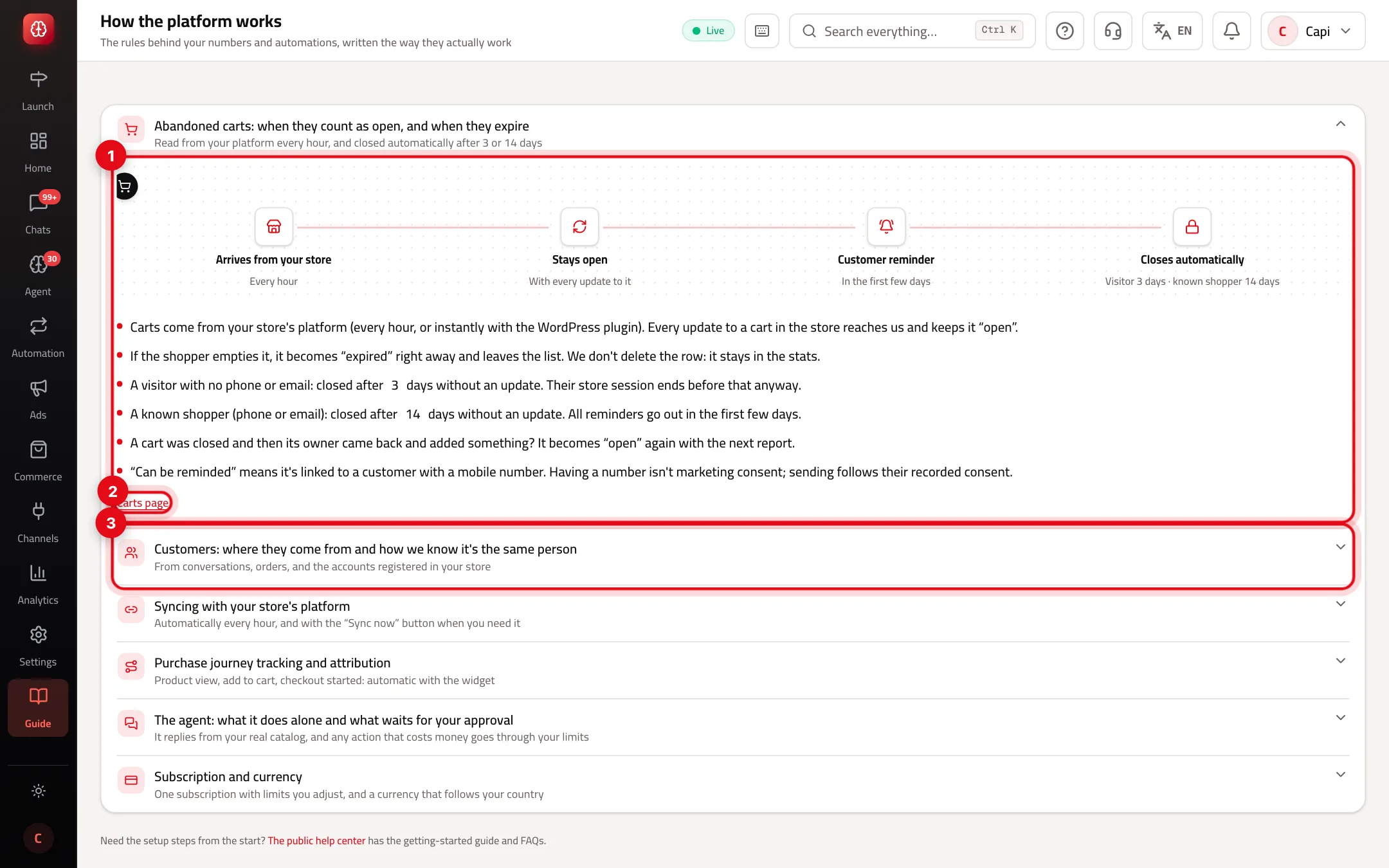
- 1The open topic: an illustrated path, then the facts point by point.
- 2A link to the page the topic talks about.
- 3A closed topic: click to open it. The small line under the title sums up the rule.
When this page helps
- When two numbers on two pages differ, look up each one's definition here before calling it a bug.
- An empty number with a reason isn't zero: it means it can't be measured, such as checkout starts on Shopify and Zid.
- Share the page with new team members — it explains in minutes what takes weeks to discover.
Common mistakes and how to fix them
ProblemA cart disappeared from the list.
FixEither the shopper emptied it, so it became “expired”, or it went without an update for its period (3 days for a visitor, 14 for a known shopper). The row isn't deleted and stays in the stats.
ProblemA “Can be reminded” cart got no message.
FixHaving a number isn't marketing consent. Sending follows the customer's recorded consent.
ProblemI deleted a product in my store and it still shows as archived.
FixThat's intended: a product that disappears from the store is archived, not deleted.
Screenshot from a demo store
Parts of the page
- 1
When to open this page
When a number looks odd, or you want to know why two numbers on two pages differ.
Related articles
Didn't find your answer?