AI agent
Product recommendations
Products the agent suggests
The products the agent recommends, and which of those turn into real sales.
Open the page in the dashboardHow recommendation results are counted
Every time the agent suggests a product in a conversation, it's recorded. This page shows each product it suggested: how often, to how many customers, and how many of those ended in a purchase.
A sale counts on a strict rule: the same customer bought the same product after the agent recommended it. Cancelled and refunded orders don't count. So these numbers are lower than any optimistic estimate — but proven.
The numbers on a product card
| Number | Meaning |
|---|---|
| Recommendations | How many times the agent suggested the product |
| Customers reached | How many different customers it was suggested to |
| Conversion | Of the customers reached, how many bought it afterwards |
| Revenue | The value of orders that followed the recommendation to the same customer |
The notes a card can show
| Note | When it shows | What to do |
|---|---|---|
| Out of stock and still recommended | Stock is zero and the product is being suggested | Restock or press “Stop recommending” |
| Strong product — it converts | At least 5 customers and 30%+ conversion | “Feature product” or a dedicated campaign |
| Recommended a lot but doesn't convert | At least 5 customers and not one purchase | Review the price, description and photos |
Steer the agent's recommendations
- 1
Sort the list
Under “Sort by” pick “Highest revenue” or “Highest conversion” to see what really sells, or search by product name.
- 2
Feature the winner
“Feature product” makes the agent prefer it over equally relevant products, and show it when a customer asks what you have.
- 3
Stop what hurts
“Stop recommending” keeps the agent from suggesting the product in any conversation until you press “Allow recommending”.
- 4
Back it with a campaign
“Create campaign” opens the campaigns page so you can launch one for the product.
Read the Product recommendations page
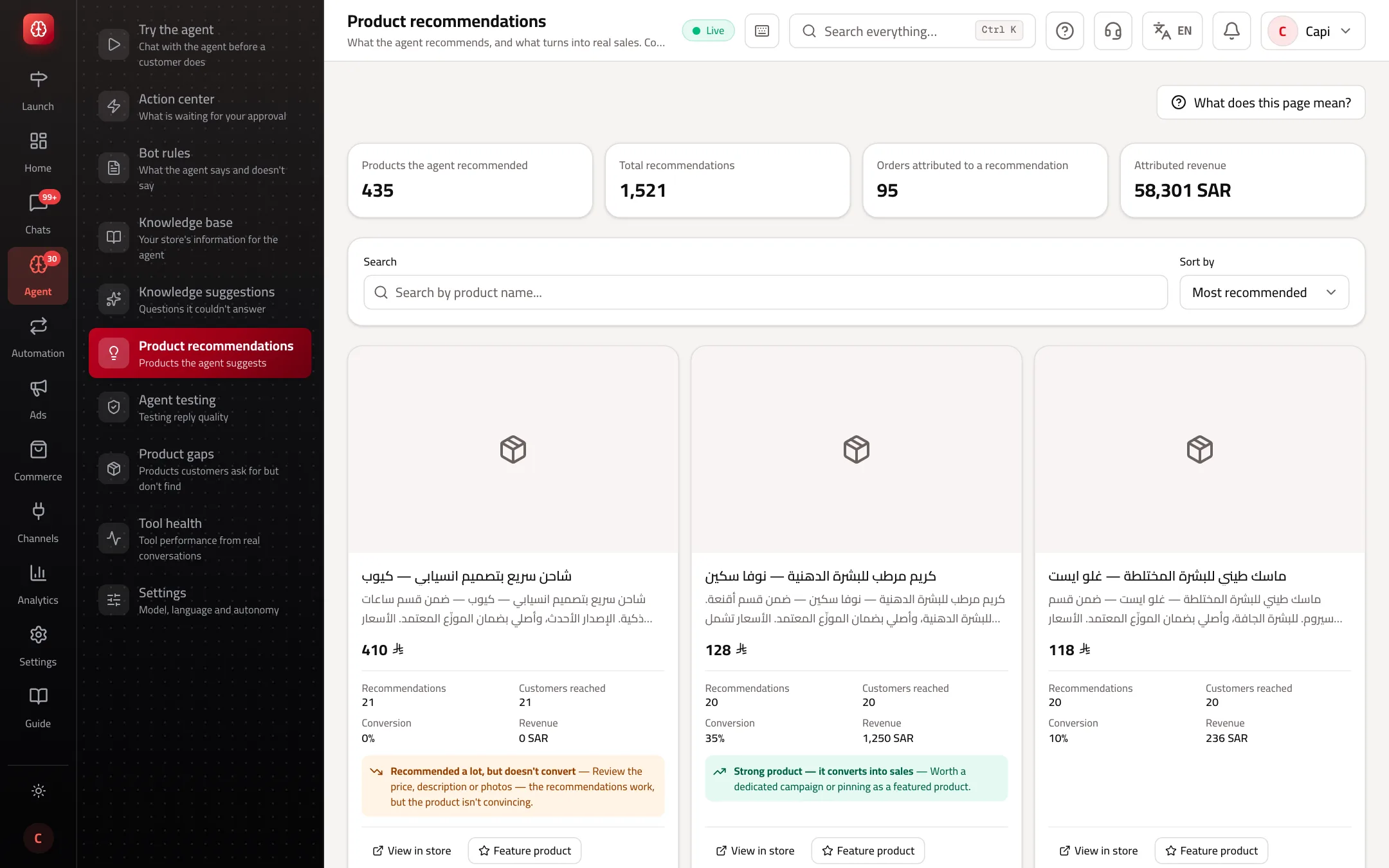
- 1Totals: products suggested, recommendations, attributed orders and revenue.
- 2Search and sort.
- 3A product card with its numbers and buttons.
Best practices
- Don't judge a product on fewer than 5 customers; that's why the notes don't appear before then.
- Stop recommending low-margin products or ones that are often returned.
- Turn on “Proactive product recommendations” in agent settings if you want it to suggest before being asked.
Common mistakes and how to fix them
ProblemThe page is empty.
FixThe agent hasn't suggested a product yet. Check “Product search” is on in agent settings and the agent works on your channels.
ProblemConversion is zero though customers bought.
FixA sale only counts when Capi knew the customer in the conversation and they bought the same product afterwards. Unknown visitors aren't counted.
Screenshot from a demo store
Parts of the page
- 1
Conversion rate
Out of every recommendation, how often it ended in a purchase.
ExampleThe agent recommended a perfume 40 times and 6 customers bought it: 15%. - 2
When does a sale count?
Only when the same customer bought the same product after the agent recommended it. A sale that isn't proven isn't counted.
Playbooks that use this page
Related articles
Didn't find your answer?