Analytics
Monthly report
A full month: revenue, cost, next steps
A finished month: what Capi brought in, what you spent on it, where the revenue came from, and next month's steps.
Open the page in the dashboardHow the monthly report works
A report covers one full, finished month, first day to last, compared with the month before. On the 1st of every month the bell and an email tell you last month's report is ready.
It computes no new numbers: each figure comes from the page that already shows it (Revenue, Conversations and the agent, ads), and each order counts once.
Pick another month from the menu at the top — months start from when your brand was created. “Print / PDF” prints the report or saves it as a file.
The verdict, the month's math and ads
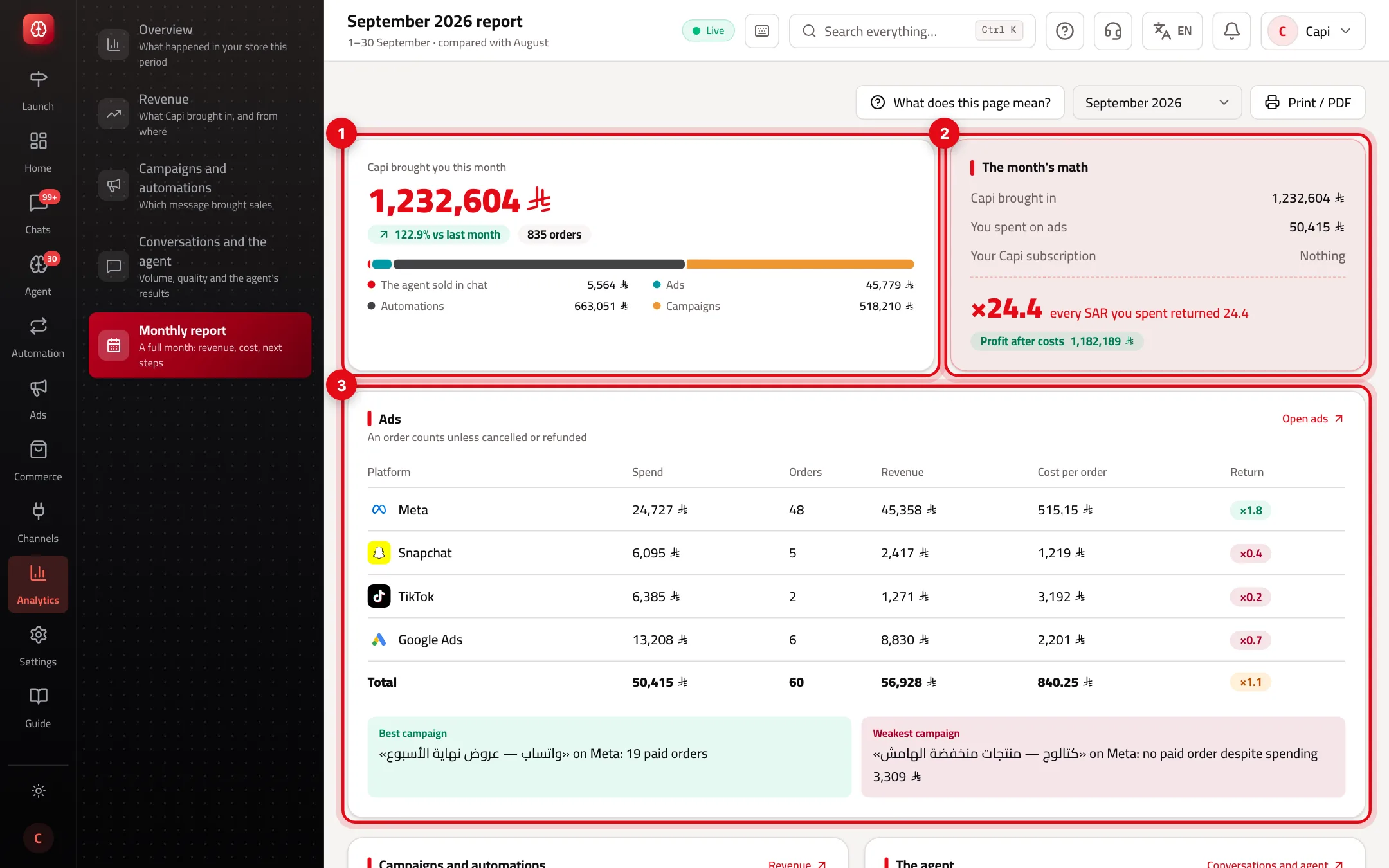
- 1“Capi brought you this month”: the month's Capi revenue, the change on last month, orders, and the split: the agent, ads, automations and campaigns.
- 2“The month's math”: what Capi brought in against what you spent on ads and your subscription, and what each unit returned.
- 3“Ads”: spend, orders, revenue, cost per order and return per platform, with the best and weakest campaign.
When “The month's math” shows a return
It divides what Capi brought in by the measured costs. If any cost is unmeasured, no multiple shows — it would flatter the result.
| Situation | What shows |
|---|---|
| Ad spend fully read and subscription known | “every … you spent returned …” and “Profit after costs” or “Short of costs by” |
| Some campaigns' spend not read yet | “Partial: some campaigns not read”, no multiple until it's complete |
| Subscription paid through Salla or Zid | The math is before the subscription, whose price doesn't reach us — a line says so |
| On the free trial | Subscription “Free trial”, not counted as a cost |
| No ads and no paid subscription | “No costs this month to compute a return on.” |
Read the rest of the report
- 1
Campaigns and automations
Orders that came after a campaign or automation message, each for the strongest source, sorted by revenue.
- 2
The agent
Conversations, the share that ended without staff, orders it helped, “Night sales” between 10 pm and 8 am, and customer rating.
- 3
Cash on delivery and next month
Two cards close the report.
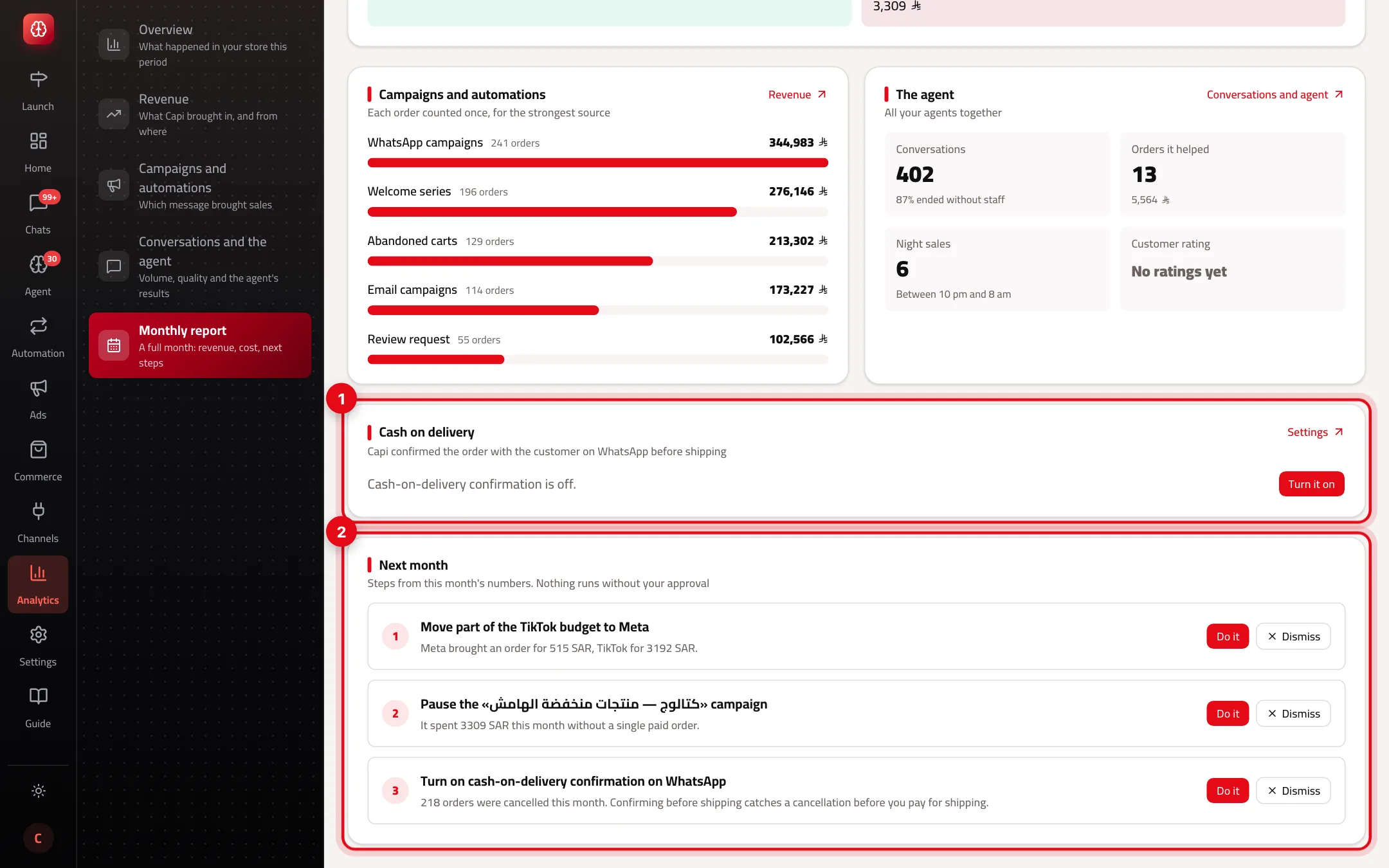
- 1“Cash on delivery”: who got a WhatsApp confirmation before shipping, confirmed, didn't reply, or cancelled before shipping. Enter a round-trip shipping cost to see what you saved.
- 2“Next month”: up to three steps from this month's numbers. “Do it” opens the page where it's done with your approval; “Dismiss” hides it for this month.
Steps “Next month” may suggest
Each rests on a number in the report. Nothing runs by itself — the button opens the page that owns it.
Move budget between platforms
- What it is
- One platform returns at least 1.5× what another returns per unit spent.
- When to use it
- When at least two platforms have a measured return this month.
- How to start
- “Do it” opens Autopilot.
Pause the weakest campaign
- What it is
- A campaign that spent 100 or more in your currency with no paid order, or returned less than it spent.
- When to use it
- When such a campaign ran this month.
- How to start
- “Do it” opens Campaigns.
Turn on the cart reminder
- What it is
- Open abandoned carts while the cart reminder is off.
- When to use it
- When the month had open carts.
- How to start
- “Do it” opens automations.
Turn on cash-on-delivery confirmation
- What it is
- Cancelled orders while WhatsApp confirmation is off.
- When to use it
- When the month had cancelled orders.
- How to start
- “Do it” opens automations.
Decisions waiting
- What it is
- Open approval requests in the Action Center.
- When to use it
- When at least one is waiting.
- How to start
- “Do it” opens the Action Center.
Using the report
- Read it with your team at the start of the month: the verdict, the math, then the three steps.
- Enter your shipping cost once in the cash-on-delivery card. From then on every report shows the returns you avoided.
- Compare the best and weakest campaign: move the weak one's budget to the best rather than spending more overall.
- Print it to PDF and keep it — months are easier to compare later.
Common misreadings
ProblemThis month's report doesn't show.
FixReports cover finished months only. This month's arrives on the 1st of next month.
ProblemNo “every … returned …” line.
FixA cost is unmeasured (ad spend not fully read, or another currency). The reason is in the card.
ProblemThe ads part of the verdict is smaller than the ads table's revenue.
FixThe verdict never counts twice an order another source (like the agent) already has. The table shows everything each platform brought.
ProblemNo cash-on-delivery saving shows.
FixEnter the round-trip shipping cost with “Enter shipping cost”.
Screenshot from a demo store
Parts of the page
- 1
The verdict
The revenue Capi can prove it brought in, each order once, against what you spent on ads and the subscription.
Example18,000 in, 3,300 spent: every riyal returned 5.5. - 2
Ads
Spend and orders per platform. An order another source already holds is not counted twice in the verdict.
- 3
Campaigns and automations
Orders that followed a campaign or automation message, each credited to the strongest source.
- 4
Cash on delivery
Orders the customer confirmed or cancelled on WhatsApp before shipping. Enter your shipping cost to see what you saved.
- 5
Next month
Up to three steps built on this month's numbers. «Do it» opens the page where it runs with your approval; «Dismiss» hides it for this month.
Related articles
Didn't find your answer?