Social media ads
Meta
Facebook & Instagram: WhatsApp ads and store ads
Meta (Facebook and Instagram): ads that open a WhatsApp chat with your agent, and ads that lead to your store.
Open the page in the dashboardHow the Meta page works
Meta (Facebook and Instagram) gives you two kinds of ads: “Click-to-WhatsApp” ads that open a WhatsApp chat with your agent, and ads that lead to your store. The page shows both, each with its own numbers.
On a WhatsApp ad the agent knows the ad from the first message, answers about that very product and closes the sale. An order counts for the ad when the same customer (or a linked phone or email) orders after a chat opened from the ad, within 30 days.
The top of the page
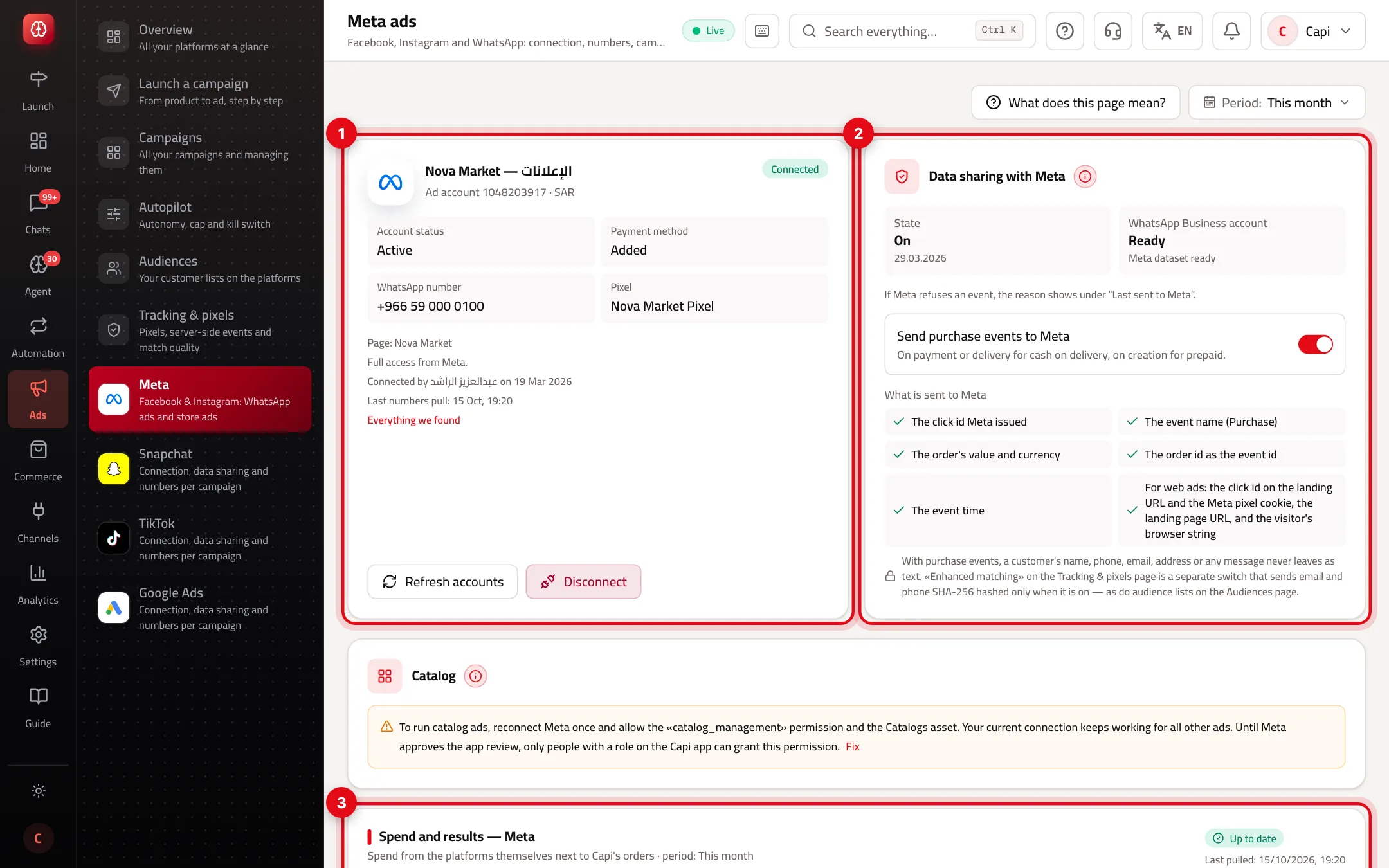
- 1The connection card: ad account and status, payment method, WhatsApp number, pixel and Page. “Everything we found” lists all Capi read from Meta.
- 2“Data sharing with Meta”: sends a purchase event for each order from an ad. Off until you turn it on.
- 3“Spend and results” for Meta only.
The two kinds of Meta ads on the page
WhatsApp ads (Click-to-WhatsApp)
- What it is
- The customer taps the ad and a WhatsApp chat with your agent opens.
- When to use it
- When you sell through chat, or the product needs questions first.
- How to start
- Their numbers are in the WhatsApp ads card: chats per ad, orders and paid orders, by campaign and ad.
Ads that open your store
- What it is
- The customer taps the ad and lands on a page in your store.
- When to use it
- When the Meta pixel is on your store and reports purchases.
- How to start
- Their numbers are under “Meta ads that open your store”, through the pixel.
Connect Meta
- 1
Press “Connect Meta”
Meta's window opens; choose your accounts there and approve every permission — the Meta connection works with all of them or not at all. You don't type any id or token.
- 2
Your assets are found for you
Capi reads the ad account, Facebook Page, WhatsApp number and pixel, and picks what fits your store. Switch any of them from the card.
- 3
Finish what's missing
WhatsApp ads need a Facebook Page linked to a WhatsApp number, and the ad account needs a payment method. What's missing shows on the card with a fix link in Meta.
- 4
Turn on data sharing
For WhatsApp ads, connect the store's WhatsApp number first — sends to Meta are signed by that WhatsApp Business account. Then turn sharing on. “Last sent to Meta” at the bottom shows what was sent and why Meta refused any event.
“Development access from Meta”
If the card shows development access from Meta, only people with a role on Capi's Meta app can connect until Meta approves the review. If connecting Meta shows as not enabled on Capi yet, contact support — nothing is needed from you.
Tips
- Advertising a product that needs questions (size, colour, stock)? Make it a WhatsApp ad — the agent answers at any hour.
- Compare cost per paid order between WhatsApp ads and store ads, and move budget to the cheaper one.
- “Disconnect” only stops Capi reading numbers and managing campaigns; your Meta campaigns stay. To remove Capi's access on Meta's side, use “Connected apps” in Business Settings.
Common mistakes and fixes
Problem“Not every permission was granted”.
FixReconnect and approve every permission — Meta's connection doesn't work with part of them.
ProblemSharing doesn't work for WhatsApp ads.
FixThe store's WhatsApp number isn't connected. Connect it under “Channels & platforms” first.
ProblemMeta refused a purchase event.
FixThe reason is in “Last sent to Meta”. Fix it and follow the result in “Tracking & pixels”.
Screenshot from a demo store
Parts of the page
- 1
Connecting
One button. After you approve, your ad accounts, pages and numbers are found and chosen on their own, and you can switch them.
- 2
“Message us on WhatsApp” ads
The customer taps the ad and a WhatsApp chat with your agent opens; the agent knows the ad from the first message.
ExampleAn ad for a black abaya: the customer writes “Is size 52 available?” and the agent answers and closes the sale. - 3
Data sharing
Sending your sales to Meta so it learns who buys. Off until you turn it on.
- 4
Spend and results
Meta's spend and your orders from it, per campaign.
Related articles
Didn't find your answer?