Settings
Subscription & billing
Your plan and invoices
Billing: your plan, usage limits and payment method.
Open the page in the dashboardHow the subscription works
One subscription with the whole platform open. There are no plans with different features: you only choose how many conversations the agent answers a month, how many marketing emails you send, and any add-ons. The price updates in front of you with every change.
Every new account starts with a 14-day trial. If it ends without a subscription, the dashboard becomes read-only and the agent, campaigns and automations pause — billing and settings stay open. Subscribe and everything comes back right away.
If your store is connected from Salla or Zid, you're billed through that platform's app store, and this page shows your plan there and where to manage it instead of a payment form.
If you're billed through Salla or Zid
This is the page for a store connected from Salla. There's no payment form here: you change or cancel your plan from the apps page in the platform's dashboard.
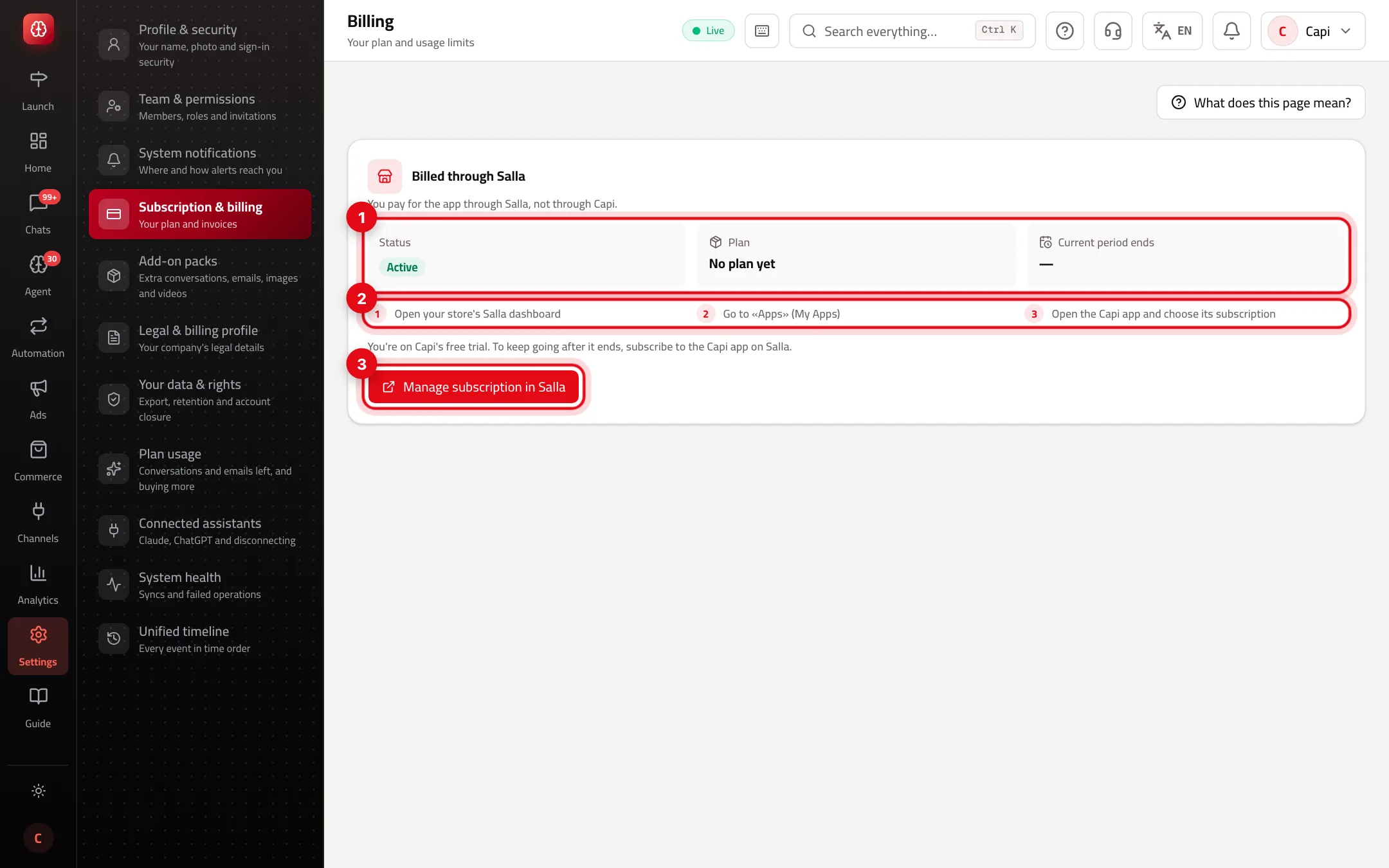
- 1Status, the plan you bought on the platform, and when the current period ends.
- 2The three steps to reach the Capi app's subscription in the platform's dashboard.
- 3“Manage subscription in Salla” opens the subscription page directly.
What you pay
Prices are monthly in US dollars. If your company is in Turkey, they're shown and charged in Turkish lira.
| Item | Included in base | Steps available |
|---|---|---|
| Base | $49 a month | — |
| Conversations per month | 500 | 1,000 (+$29) · 2,500 (+$129) · 5,000 (+$299) · 10,000 (+$649) · 25,000 (+$1,679) · 50,000 (+$3,409) |
| Marketing emails per month | 5,000 | 25,000 (+$35) · 50,000 (+$69) · 100,000 (+$139) · 250,000 (+$339) · 500,000 (+$549) · 1,000,000 (+$990) |
| Social media ads | — | +$100: launch and run ads on Meta, Snap, TikTok and Google, unlimited copy, plans and analysis, and 30 AI image requests a month |
| Dedicated account manager | — | +$100: someone on our team owns your account |
Each conversation is about 4 AI calls, counted automatically. Yearly is paid up front at 10 months instead of 12. Your ad budget itself is paid to the ad platform directly.
Free and unlimited on any subscription
| Item | Limit |
|---|---|
| Team members | Unlimited |
| Customers | Unlimited |
| Brands | Unlimited — all drawing on the same plan |
| Automations | Unlimited |
| WhatsApp messages | Unlimited — on your own number, Meta bills you directly |
| Capi, your agent manager | Daily brief, weekly report and service-quality analysis |
| Onboarding and setup | Free |
Subscribe
- 1
Complete your legal profile
The payment provider needs your legal name, country, legal address, city, contact phone, billing email, and the tax number where your country requires it. If anything's missing, a line says your legal billing details are incomplete, with a button to finish them.
- 2
Move the sliders
Pick conversations and emails. Steps round up: needing 501 conversations means the 1,000 step.
- 3
Pick add-ons and the cycle
Turn on the add-ons you need and choose “Monthly” or “Yearly” (two months free).
- 4
Pay
Press “Subscribe for” and finish on the payment provider's page. Once it goes through you'll see “You're subscribed!”.
Subscription statuses
| Status | What it means | What to do |
|---|---|---|
| Trial | Your first 14 days. | Choose a plan before it ends and nothing is interrupted. |
| Expired | The trial ended with no subscription; the dashboard is read-only. | Subscribe and everything is back at once. |
| Active | A paid subscription. | “Manage subscription” or “Update card”; cancel from the same place. |
| Past due | The last charge failed. Your account keeps working. | Update your payment method with the button at the top. |
| Canceled | The subscription was canceled. | Subscribe again whenever you like. |
Tips
- Start with the base (500 conversations) and watch “Plan usage”. You're alerted at 80% and 100%.
- If conversations run out mid-month you don't need to upgrade — buy an add-on pack, added instantly.
- Change your limits any time. No switching between plans, just move the slider.
- Pick Yearly once you're sure of your volume and save two months.
Common mistakes and how to fix them
Problem“Subscribe” opens “Complete your billing details”.
FixFill in the missing fields and save, then press “Subscribe” again.
Problem“The payment provider rejected your billing details”.
FixWrite the phone with its country code, the tax or ID number as digits only, and check the address and city.
ProblemThere's no payment form; it says I'm billed through Salla or Zid.
FixManage the subscription from that platform's app store.
ProblemNothing saves and the agent has stopped.
FixYour trial has ended. Subscribe from this page.
Problem“You don't have permission to manage billing”.
FixSubscribing needs the “Manage subscription” permission. Ask the owner for it, or ask them to subscribe.
Screenshot from a demo store
Parts of the page
- 1
Plan
What your plan includes and its limits. Subscribe, update your card or cancel from here.
- 2
After the trial
When the trial ends without a subscription the dashboard becomes read-only, and the agent and campaigns stop until you subscribe.
Related articles
Didn't find your answer?