Social media ads
Tracking & pixels
Pixels, server-side events and match quality
The tracking guardian: do your ad sales reach the platforms, and do the platforms' numbers reach Capi — over the last 30 days.
Open the page in the dashboardWhy tracking matters
A platform learns from who buys. If your sales don't reach it, it shows your ad to people who don't buy, and you pay more per order.
The tracking guardian checks both directions over the last 30 days: are your ad sales reaching the platforms, and are the platforms' numbers reaching Capi. The page is read-only; each check links to where it's fixed.
It starts once an ad platform is connected or the first sale from an ad arrives. A problem it finds also shows under “Needs your attention” on the overview and on that platform's campaign numbers.
Read the guardian from the top
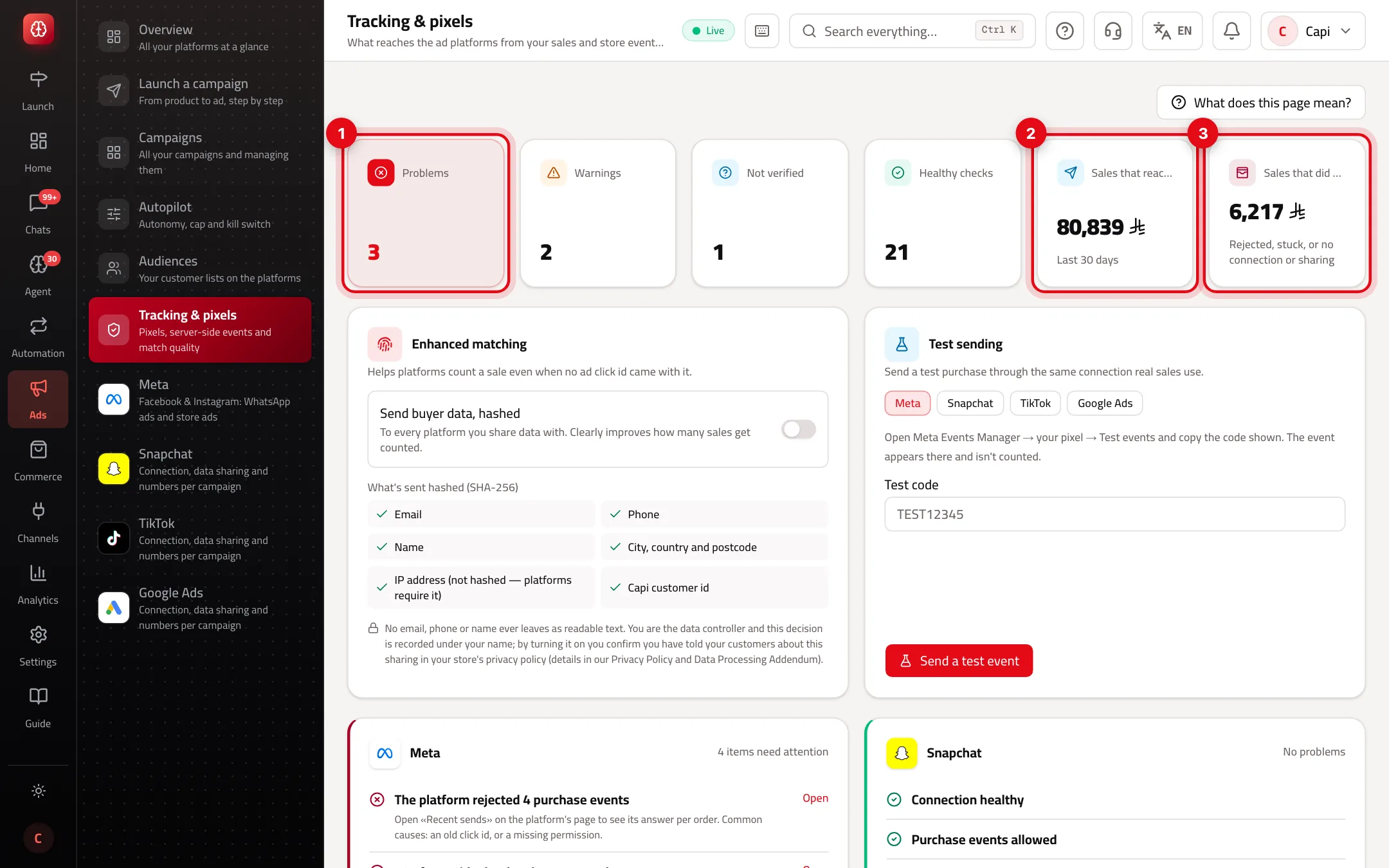
- 1Checks by state: problems, warnings, not verified and healthy.
- 2“Sales that reached the platforms”: the value of ad sales whose purchase event arrived, last 30 days.
- 3“Sales that did not reach them”: rejected, stuck, or no connection or sharing.
Check states
Healthy
- What it is
- The check works as it should.
- When to use it
- Nothing to do.
- How to start
- —
Warning
- What it is
- Something weakens measurement without stopping it — data sharing off, numbers not updated for over a day.
- When to use it
- Fix it soon.
- How to start
- Press “Open” beside the check.
Problem
- What it is
- Something stops measurement — a broken connection, events the platform rejected, stuck events.
- When to use it
- Fix it now.
- How to start
- Press “Open” beside the check.
Not verified
- What it is
- Can't be confirmed yet — sending never proven, or unknown whether your store has a pixel.
- When to use it
- Waiting for more data or your confirmation.
- How to start
- Read the line under the check.
What the guardian checks per platform
| Check | What it asks |
|---|---|
| Connection | Is it healthy, and does it allow sending purchase events? |
| Data sharing | Is purchase data sharing on for this platform? |
| Purchase events | How many arrived, were rejected, or are stuck? |
| Coverage | Does every paid order from ads have a purchase event? Did some pass the platform's window? |
| Click id | Do ad conversations arrive with the click id that ties them to the ad? |
| Match data | Does the purchase event carry enough to match an account, or only the click id? |
| Numbers sync | Are the platform's numbers current, or not updated for over a day? |
| Your store's pixel | Does your store's pixel also send purchases, so a sale counts twice? |
Stop a sale from counting twice
If the platform's pixel on your store sends purchases itself and Capi sends them too, the platform may count the sale twice.
- 1
Read the store-pixel check
If it says your store's pixel was detected, Capi keeps sending until you confirm.
- 2
Confirm
Press “Confirm my pixel” only if the pixel is yours and really sends the purchase event. Capi stops sending web purchases to that platform while your pixel keeps being seen.
- 3
Undo if needed
“Let Capi send” starts sending again. If your store's pixel also sends them, a sale may count twice.
What Capi can't see
Browser pixel events your store sends itself (product view, add to cart, checkout) and the platform's official match score — check those in the platform's Events Manager. The guardian shows the coverage of the data Capi sent. Confirming and undoing need permission to edit settings.
Tips
- Open this page before launching a “Sales on the website” campaign — without purchase events arriving, the platform doesn't know who to look for.
- Turn on data sharing for every platform you advertise on; it's off until you do.
- “Sales that did not reach them” is the amount the platforms didn't learn from. Keep it near zero.
Common misreadings
ProblemThe guardian says “Nothing to check yet”.
FixNo platform is connected and no sale from an ad has arrived. Connect an ad platform.
ProblemStuck events mean Capi has stopped.
FixA stuck event is retried automatically. If it stays stuck, the reason is under the check — often the connection needs renewing.
ProblemI confirmed the pixel and the numbers dropped.
FixNormal: the double counting stopped. If your store's pixel doesn't actually send purchases, press “Let Capi send”.
Screenshot from a demo store
Parts of the page
- 1
Why it matters
Platforms learn from who buys. If your sales don't reach them, they show your ad to people who don't buy, and you pay more.
Example20 orders from Meta ads this week, and only 5 reached Meta: the guardian tells you where it breaks.
Related articles
Didn't find your answer?