Conversations
Conversation counters
Live conversation numbers
Customer-service numbers: reply times, keeping to targets, and delays — for the whole store and per person. A measure without enough data shows empty rather than an invented number.
Open the page in the dashboardWhat the counters measure
Customer-service numbers: reply times, keeping to targets and delays, for the whole store and for each team member. Every number comes from real conversation data; a metric without enough data shows “—”, not zero.
The page is available to members who can view reports, not to everyone who works the inbox: working conversations doesn't entitle someone to see every colleague's performance.
Read the page
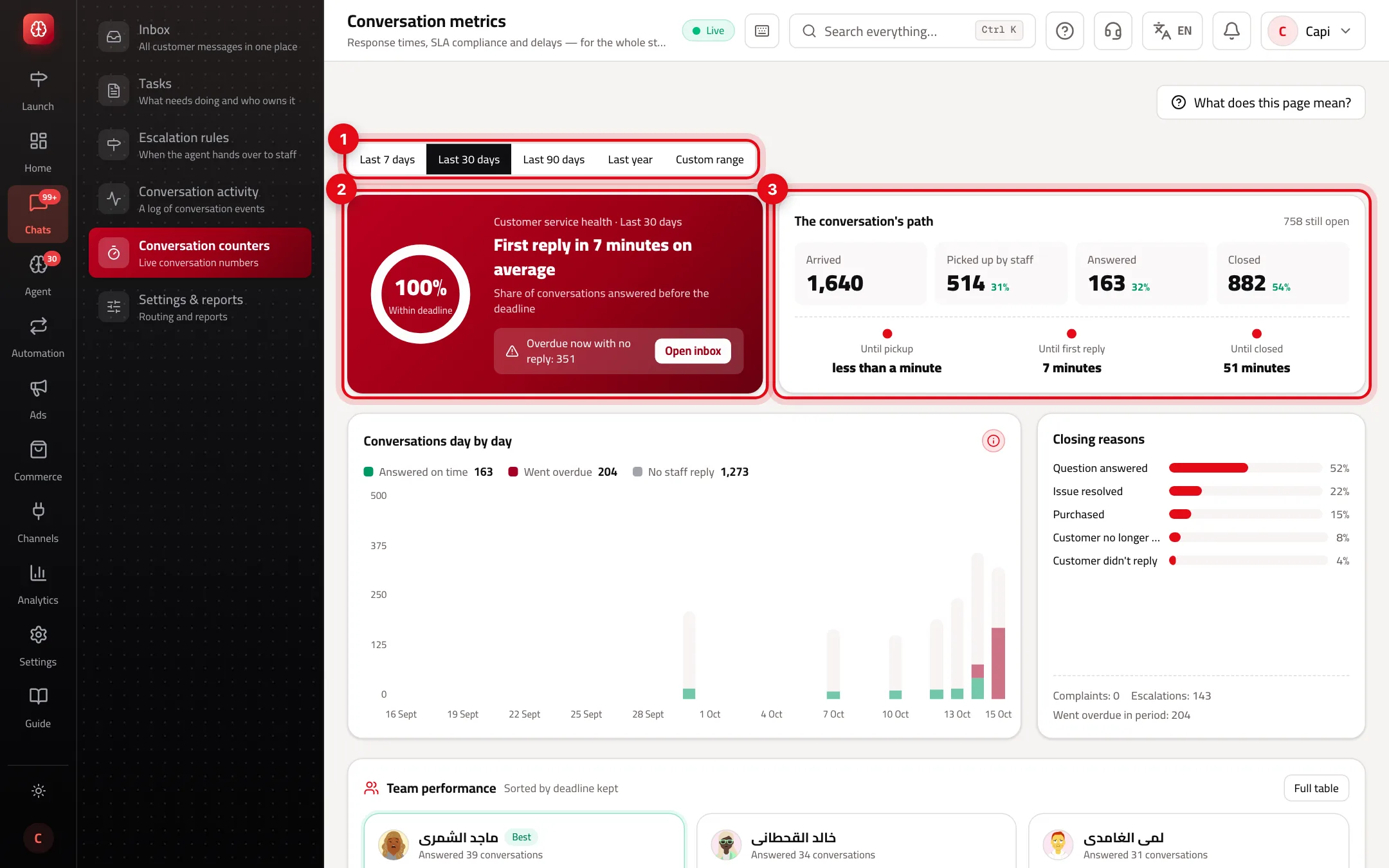
- 1The period: last 7, 30 or 90 days, last year, or “Custom range”.
- 2“Customer service health”: average first reply and conversations overdue now with no reply, with an “Open inbox” link.
- 3“The conversation's path”: how long until pickup, until first reply, and until closed.
The metrics
| Metric | How it's calculated |
|---|---|
| Avg. pickup time | From the conversation arriving to a team member picking it up. |
| Avg. first reply time | From the conversation arriving to the first human reply. |
| SLA compliance | Share of conversations answered before the deadline, out of those picked up. |
| Overdue | Went overdue in the period, even if answered later. |
| Overdue now | Past the deadline with no reply yet. |
| Conversations closed as a complaint | The closing reason was “Complaint”. |
| CSAT | The average rating, if rating requests are on. |
| Attributed revenue | The customer bought within the attribution window after this team member handled them. Not proof the team member caused the sale. |
In “Conversations day by day” each conversation counts on the day it arrived: answered on time, went overdue, or no staff reply. “No staff reply” can mean the agent handled it or nobody did — the data can't tell which.
Getting value from the numbers
- Compare “Avg. first reply” with the first-reply target in conversation settings. If it's consistently higher, the target is unrealistic or the team is short.
- “Team performance” is sorted by deadline kept. Open “Full table” to see every column for every person.
- A jump in “Complaint” closing reasons in one week is worth reading those conversations in conversation activity.
- Don't judge a team member by “Attributed revenue” alone; the customer may have bought anyway.
Common mistakes and how to fix them
ProblemEvery number is “—”.
FixNo conversation was picked up by a team member in this period. Numbers appear once the team picks up conversations with “Start conversation”.
Problem“You don't have access” shows.
FixThe page is available to members who can view reports. Ask the account owner for it.
Problem“SLA compliance” is low although the team is fast.
FixCheck the targets in conversation settings and the store's time zone; targets are calculated in that zone.
Screenshot from a demo store
Parts of the page
- 1
First reply time
How long the customer waited for your team's first reply.
- 2
Keeping to targets
The share of conversations answered and resolved within the targets you set in conversation settings.
- 3
Per person
The same numbers for each team member, so you see who needs help.
Related articles
Didn't find your answer?