AI agent
Settings
Model, language and autonomy
Here you decide how the agent works: what it may do, when it replies, and when it needs your approval. The preview beside it shows how it would reply right now with your current settings.
Open the page in the dashboardWhat you control here
Here you decide what the agent may do, when it replies, and when it needs your approval. Each section saves on its own. Beside them, “How it will reply now” is an example computed from your settings that changes as you edit, before you save.
The difference from Bot rules: here is what the agent can do and limits it can't cross. Rules are how it talks and what it says.
Tools and their defaults
A disabled tool is a capability the agent never uses:
| Tool | What it does | Default |
|---|---|---|
| Product search | Searches your catalog and shows real products | On |
| Smart meaning-based search | Understands what the customer means even in different words | On |
| Shipping tracking | Helps the customer track their order | On |
| Discount coupons | Gives the customer a discount within the maximum | On |
| Proactive product recommendations | Asks and suggests before being asked | Off |
| Refunds & order cancellations | Starts a refund or cancels an order that hasn't shipped | Off |
| Customer memory | Remembers the customer's size, taste and budget from past conversations | Off |
| Save date of birth | Asks for the customer's birthday for the “Birthday greeting” automation | Off |
Autonomy levels
They decide what happens when the agent needs a sensitive action, such as a discount or a refund:
Observe
- What it is
- Never takes any sensitive action.
- When to use it
- Day one, while you watch how it talks.
- How to start
- A refund request becomes a conversation that needs a team member.
Suggest
- What it is
- Replies to the customer, with no sensitive actions.
- When to use it
- You want full replies and your team does the actions.
- How to start
- Same as “Observe” for actions.
Approve (default)
- What it is
- Takes sensitive actions after you approve.
- When to use it
- The safe level for most stores.
- How to start
- Every request lands in the Action Center.
Execute
- What it is
- Acts right away within the limits you set.
- When to use it
- Once you trust its decisions.
- How to start
- Discounts stay within “Maximum discount”, and any refund above the “Automatic refund limit” needs your approval.
Full autonomy
- What it is
- Acts right away with no limits; neither the discount cap nor the refund cap applies.
- When to use it
- Rarely. Not recommended for most stores.
- How to start
- Nothing lands in the Action Center.
Set up the agent
- 1
Turn the team on
“Turn on the agent team” at the top is the main switch. It doesn't work before setup is complete, and what's missing shows beside it. When it's off the agent doesn't reply, and messages go to your team.
- 2
Choose the tools
Under “Permissions & tools” turn on only what your store needs. In “Discount coupons” you can also set an official discount code.
- 3
Choose the autonomy level and limits
Pick the level, then set “Maximum discount” (default 10%) and “Automatic refund limit” in your store's currency (default 300), and press “Save”.
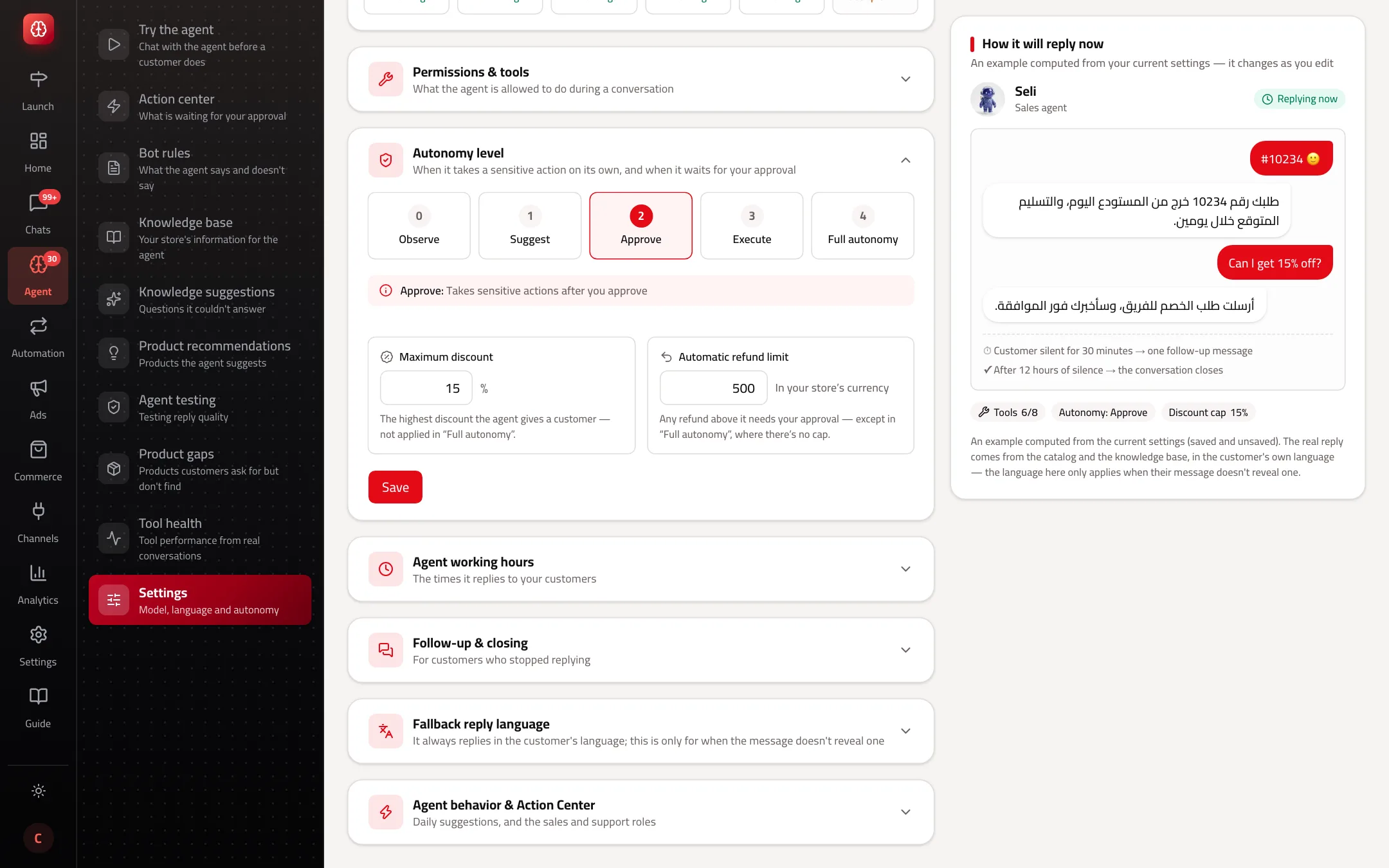
- 1The five levels.
- 2Maximum discount and the automatic refund limit.
- 4
Set working hours
In “Agent working hours” pick the time zone and add up to 4 periods a day, or “24/7”. On a day with no period the agent doesn't reply, and messages are kept for your team.
- 5
Follow-up and closing
“One follow-up message” after 30 minutes of silence, then “Auto-close the conversation” after 12 hours. Those are the defaults; with follow-up on, the closing countdown starts after the follow-up message.
- 6
Language and behaviour
The “Fallback reply language” is used only when a message doesn't reveal its language, such as an order number alone; otherwise the agent always replies in the customer's language. Under “Agent behavior & Action Center”: “Proactive suggestions” and “Agent modes (sales / support)”.
Read the settings page

- 1“Turn on the agent team” and each agent's status.
- 2The sections: press a section title to open it.
- 3“How it will reply now”: a preview from your current settings.
A refund in Capi doesn't return the money
When the agent carries out a refund or cancellation, or you approve one, the order's status changes in Capi only. Returning the money or cancelling the order on your platform is done by you in your store admin.
Best practices
- Start at “Approve”, watch the Action Center for two weeks, then move to “Execute” with small limits.
- Keep “Maximum discount” below your margin on your weakest products.
- Turn on “Customer memory” if customers come back often; the agent stops asking the same questions again.
- Pause the agent during a stock count so it doesn't promise products that ran out.
Common mistakes and how to fix them
ProblemThe main switch won't turn on.
FixSetup isn't complete. Read “The team can't be turned on yet” and what's missing below it, such as an escalation team or 3 knowledge-base entries.
ProblemThe agent doesn't reply on a certain day.
FixThat day has no period in “Agent working hours”. Add one, or use “Copy to all days”.
ProblemThe agent gave a bigger discount than the cap.
Fix“Full autonomy” doesn't apply limits. Choose “Execute” or “Approve”.
ProblemThe agent doesn't suggest products.
Fix“Product search” is off, or the product was stopped under Product recommendations.
Screenshot from a demo store
Parts of the page
- 1
Turning the agent on
The main switch. When it's off the agent doesn't reply, and messages go to your team's inbox.
ExamplePause it during a stock count so it doesn't promise products that ran out. - 2
Permissions and tools
What the agent can do in a conversation: search your products, track orders, create a coupon, request a refund.
ExampleTurn off “Order tracking” and the agent can't tell a customer where their order is. - 3
Autonomy level
When the agent carries out sensitive actions (discounts, refunds) on its own and when it waits for you. At “Acts within limits” it keeps to the maximum discount and refund you set.
ExampleWith a 10% cap: the customer asks for 20%, the agent offers 10%. - 4
Agent working hours
When the agent replies to your customers. On a day with no period it doesn't reply.
- 5
Follow-up and closing
What happens with a customer who stopped replying: the agent sends a reminder after a while, then the conversation closes if they don't come back.
ExampleAfter 30 minutes of silence the agent asks “Still looking for your size?”, and after 12 hours the conversation closes. - 6
Fallback reply language
The agent always replies in the customer's language. This one is used only when a message doesn't reveal its language.
ExampleThe customer sends only “#1043”, and the agent replies in the fallback language. - 7
Agent behaviour and Action Center
The daily suggestions you get in the Action Center, and whether the agent switches between sales and support style depending on the conversation.
Playbooks that use this page
Related articles
Didn't find your answer?