Automations & campaigns
Sending rules
Sending limits and timing
Sending rules: how many messages a customer gets, and when, so you don't tire them or get blocked.
Open the page in the dashboardWhat you set here
Sending rules decide how many marketing messages one customer gets, when, and who has priority. They apply to every send path at once — campaigns, automations and proactive chat — on every channel. Every save creates a new version.
The gate has two modes. “Dry run — records, doesn't block”: it records what it would have done while sending uses the older protection. “On — deciding”: a message that exceeds the customer's limits or falls in quiet hours is deferred, and a prohibited one is blocked with its reason. You can go back to dry run at any time.
“Turn on the gate” works after two conditions on the “Status” panel: “Last 30 days moved” is complete and matching, and “Dry run age” is at least 72 hours. The gate needs your message history to know who reached a limit, and days of trial to show its effect before you decide.
Read the sending rules page
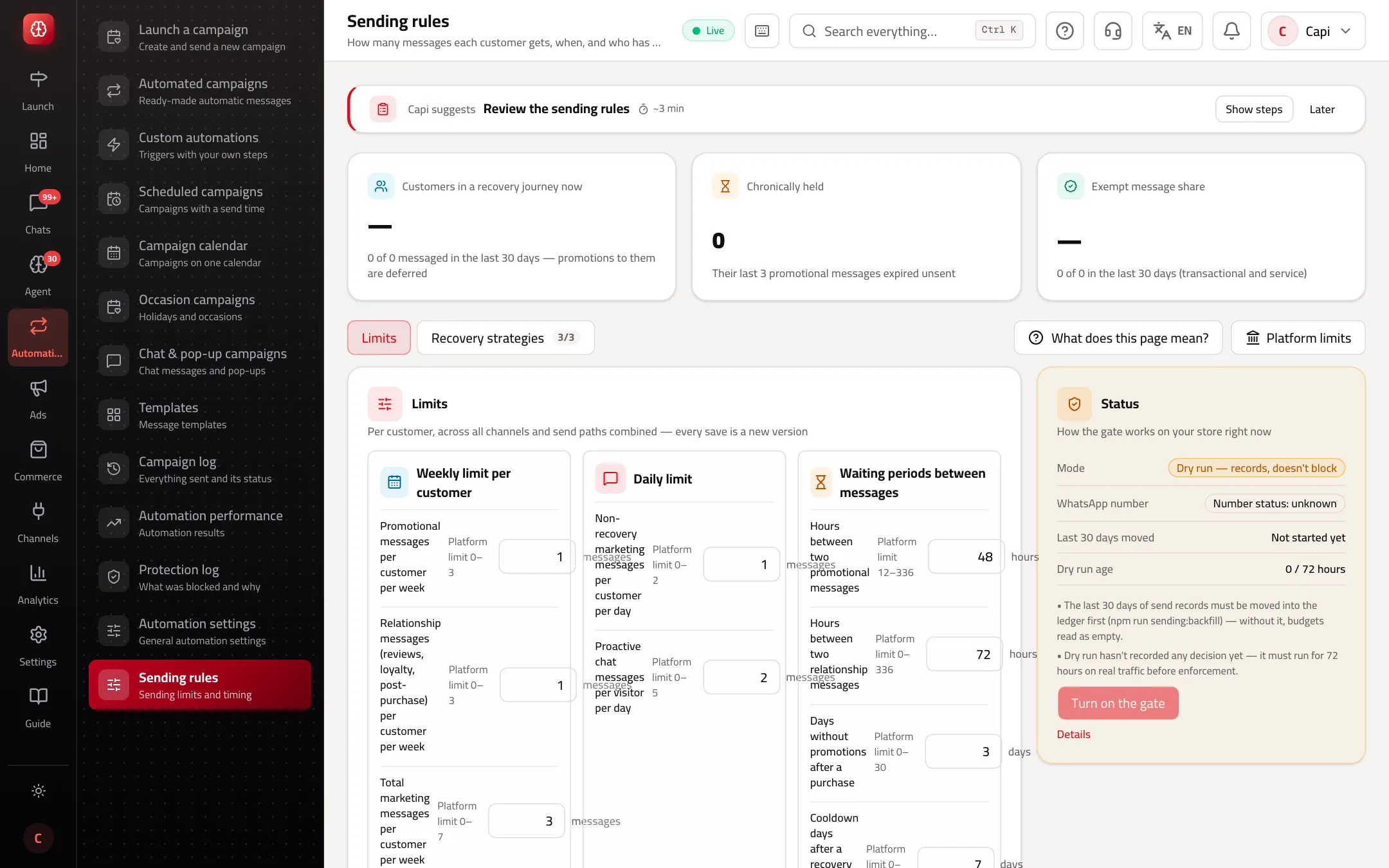
Limits: default and what the platform allows
Per customer, across all channels and send paths combined. A value outside the platform limit is refused on save.
| Limit | Default | Allowed |
|---|---|---|
| Promotional messages per customer per week | 1 | 0–3 |
| Relationship messages (reviews, loyalty, post-purchase) per customer per week | 1 | 0–3 |
| Total marketing messages per customer per week | 3 | 0–7, not below the promotional limit |
| Non-recovery marketing messages per customer per day | 1 | 0–2 |
| Hours between two promotional messages | 48 | 12–336 |
| Hours between two relationship messages | 72 | 0–336 |
| Days without promotions after a purchase | 3 | 0–30 |
| Cooldown days after a recovery journey with no purchase | 7 | 0–60 |
| Proactive chat messages per visitor per day | 2 | 0–5 |
| Quiet hours, in your store's time zone | 22:00 – 09:00 | 23:00–07:00 is always quiet |
| Marketing during Friday prayer | Not sent | Can be turned off |
Message classes
The gate doesn't treat every message as a promotion. A message's class is derived from its source and evidence, never declared by hand.
Transactional
- What it is
- News about the customer's own order: order status notifications.
- When to use it
- Needs a real order of this customer.
- How to start
- Doesn't count toward marketing limits.
Service
- What it is
- A reply to a customer who wrote within 24 hours.
- When to use it
- Needs a real inbound message.
- How to start
- Doesn't count toward marketing limits.
Recovery
- What it is
- Abandoned cart and browse abandonment.
- When to use it
- One active journey per customer at a time.
- How to start
- Follows the “Recovery journey priority” and its strategies.
Relationship
- What it is
- Welcome, post-purchase, review, loyalty, anniversary, birthday, refill and reorder reminders, and custom automations.
- When to use it
- Counts toward the relationship limit and the total.
- How to start
- Respects unsubscribes.
Promotional
- What it is
- Campaigns and customer win-back.
- When to use it
- The most restricted.
- How to start
- Counts toward the promotional limit and the total, and waits some days after a purchase.
Edit the limits and turn on the gate
- 1
Check “Status”
“Mode”, “WhatsApp number” (its rating from Meta), “Last 30 days moved” and “Dry run age”.
- 2
Edit the limits
Under “Limits”: “Weekly limit per customer”, “Daily limit”, “Waiting periods between messages”, “Quiet hours” and “Recovery journey priority”. Press “Save as version”.
- 3
Read the trial
Open “Protection log” → “Dry run — what would have been blocked” for a few days. If what it would stop looks right, move on.
- 4
Turn it on
Press “Turn on the gate”, then “Turn on” in the confirmation. If the conditions aren't met, the reasons show instead.
Recovery strategies
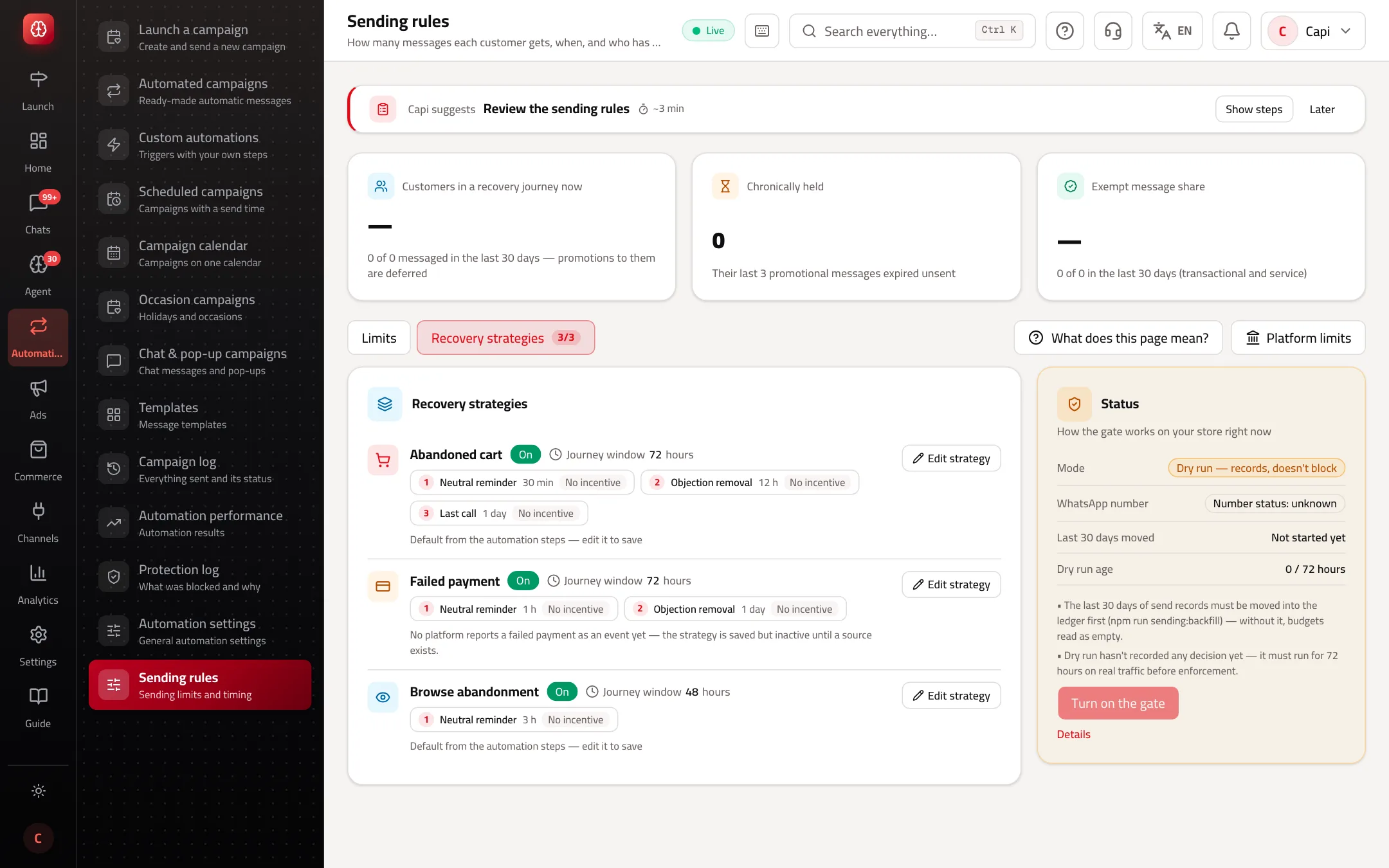
Each recovery journey (abandoned cart, failed payment, browse abandonment) has a window and a number of touches; each touch has a timing, an “Angle” (neutral reminder, objection removal, last call) and an “Incentive” (none, discount, free shipping). A saved strategy's timing takes precedence over the automation steps. The first abandoned-cart touch never carries an incentive. Limits: 5 touches, a window of up to 336 hours, discounts from 1 to 90%. Failed payment is saved but inactive until a platform reports it as an event.
The WhatsApp number's rating narrows the limits
| Rating | Effect |
|---|---|
| Unknown | No increase above the defaults until Meta gives a green rating. |
| Green | Your values apply as they are. |
| Yellow | Weekly limits are halved. |
| Red | Promotional sends are paused. |
Sensible settings
- Start with the defaults. They're designed for a store that sends a weekly campaign and runs cart and order automations.
- Don't raise the promotional limit before the “Protection log” shows your customers engage; raising it on an unengaged audience brings blocks.
- Keep abandoned cart first in priority — that customer is closest to paying.
- Save the incentive for the second or third touch. A discount on the first reminder teaches customers to leave their cart.
Common mistakes and how to fix them
ProblemIt says “Sending rules are off on this deployment”.
FixThe sending control plane isn't running here. Every path runs on its legacy rules: the weekly automation cap, fixed quiet hours, and the emergency stop.
Problem“Turn on the gate” doesn't work.
FixThe reasons show under it: usually the dry run hasn't reached 72 hours, or the last-30-days move isn't complete and matching.
ProblemSaving was refused.
FixA value is outside the platform limit, or the marketing total is below the promotional limit. The message names the limit.
Screenshot from a demo store
Parts of the page
- 1
Weekly limits
The most promotional messages one customer gets per week, from campaigns and automations together.
ExampleA limit of 3 a week: however many campaigns run this week, no customer gets more than 3 promotional messages. - 2
Quiet hours
Times when no promotional message is sent, such as night and Friday prayer. Anything falling there waits.
- 3
Message types
A message about the customer's own order (shipping, delivery) isn't promotion, so it doesn't count toward marketing limits.
Playbooks that use this page
Related articles
Didn't find your answer?