Commerce
Orders
Your store's orders
Orders that came with Capi's help: from the agent's conversations, and from your campaigns and automations.
Open the page in the dashboardHow the orders page works
Orders arrive from your store platform with every sync; they aren't created here. The page shows them in three lists: every store order, orders the agent helped close in a conversation, and orders the platform attributes to a campaign or automation you sent.
Note: “Total revenue” at the top is the value of AI-assisted orders only, not your whole store's sales.
Read the page
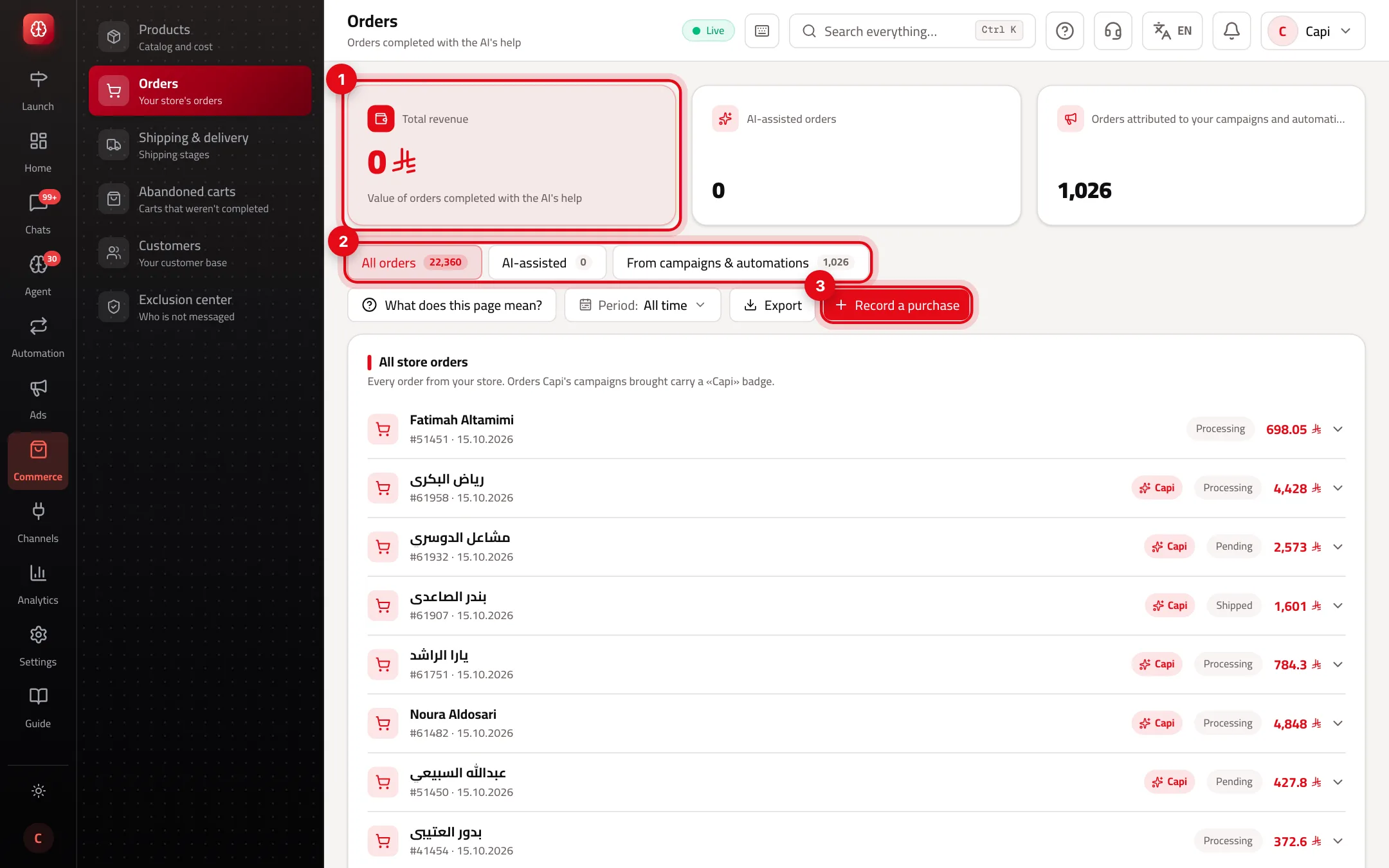
- 1“Total revenue”: the value of AI-assisted orders. Next to it, how many such orders, and how many orders are attributed to your campaigns and automations.
- 2The three lists with their counts: “All orders”, “AI-assisted” and “From campaigns & automations”.
- 3“Record a purchase”: for a sale made outside the store, such as a bank transfer after a chat.
The three lists — which one to open
All orders
- What it is
- Every order from your store. Orders a Capi campaign brought carry a «Capi» badge.
- When to use it
- To follow daily orders and each order's status.
- How to start
- The default list. Press an order to see “Track shipment”.
AI-assisted
- What it is
- Purchases made after a chat with the agent, linked to that chat.
- When to use it
- To see what the agent sells, and why the customer bought.
- How to start
- Press “View conversation” next to the order.
From campaigns & automations
- What it is
- Real store orders the platform attributes to a campaign or automation message you sent.
- When to use it
- To measure what your campaigns return.
- How to start
- Open the tab and change the “Period” to compare.
Order statuses
The status comes from your platform. Capi doesn't change it:
| Status | What it means |
|---|---|
| Pending | The order arrived and hasn't started |
| Processing | Being prepared for shipping |
| Shipped | Handed to the carrier |
| Delivered | Reached the customer |
| Cancelled | The order was cancelled |
| Refunded | The money was returned |
“Track shipment” shows Ordered → Shipped → Delivered, with the carrier, tracking number and expected date when the platform sends them. A cancelled or refunded order shows no timeline.
Record a purchase by hand
- 1
Open the window
Press “Record a purchase”.
- 2
Pick the customer, product and amount
Search the customer and the product by name, and type the amount paid.
- 3
Save
The sale is linked to this customer's latest conversation and counted in analytics, and the order-confirmation automation runs if it's on. It doesn't create an order in your platform.
Best practices
- Record every sale closed after a chat outside the store (transfer, cash on delivery over WhatsApp). Without it the agent looks like it sold nothing.
- Compare “From campaigns & automations” month to month by changing the “Period” to see which campaign brought real orders.
- “Export” downloads the open list for the chosen period as Excel or CSV.
Common mistakes and how to fix them
Problem“Total revenue” is far below my store's sales.
FixThat number is AI-assisted orders only. All store sales are under “All orders” and in Analytics.
ProblemA new order doesn't show.
FixAutomatic sync runs twice a day. For something urgent open “Stores & platforms” → the brand → “Sync” and press “Sync now”.
ProblemThe order status here is old.
FixUpdate the status in your platform; it arrives with the next sync.
Screenshot from a demo store
Parts of the page
- 1
AI-assisted orders
Each order is linked to the conversation that led to it, so you can open it and see what the agent said until the customer bought.
ExampleA 480 SAR order → “View conversation” → you see the agent suggested the size and sent the payment link. - 2
Orders from your campaigns and automations
Real orders from your store placed by customers after a campaign or automation message, with shipment tracking.
- 3
Record a purchase by hand
If the sale happened outside the system (a bank transfer, say), record it here so it counts for its conversation.
Related articles
Didn't find your answer?