Commerce
Abandoned carts
Carts that weren't completed
Abandoned carts: visitors who reached checkout and didn't finish — the people closest to buying.
Open the page in the dashboardHow the abandoned carts page works
An abandoned cart is a visitor who reached checkout and didn't finish. Capi reads these carts from your store platform every hour, and the platform decides when a cart counts as abandoned.
Reading carts needs a dedicated permission from your platform. If it hasn't been granted, the “Status per platform” panel says so plainly, and the sync log shows a message asking you to re-authorize.
Read the page
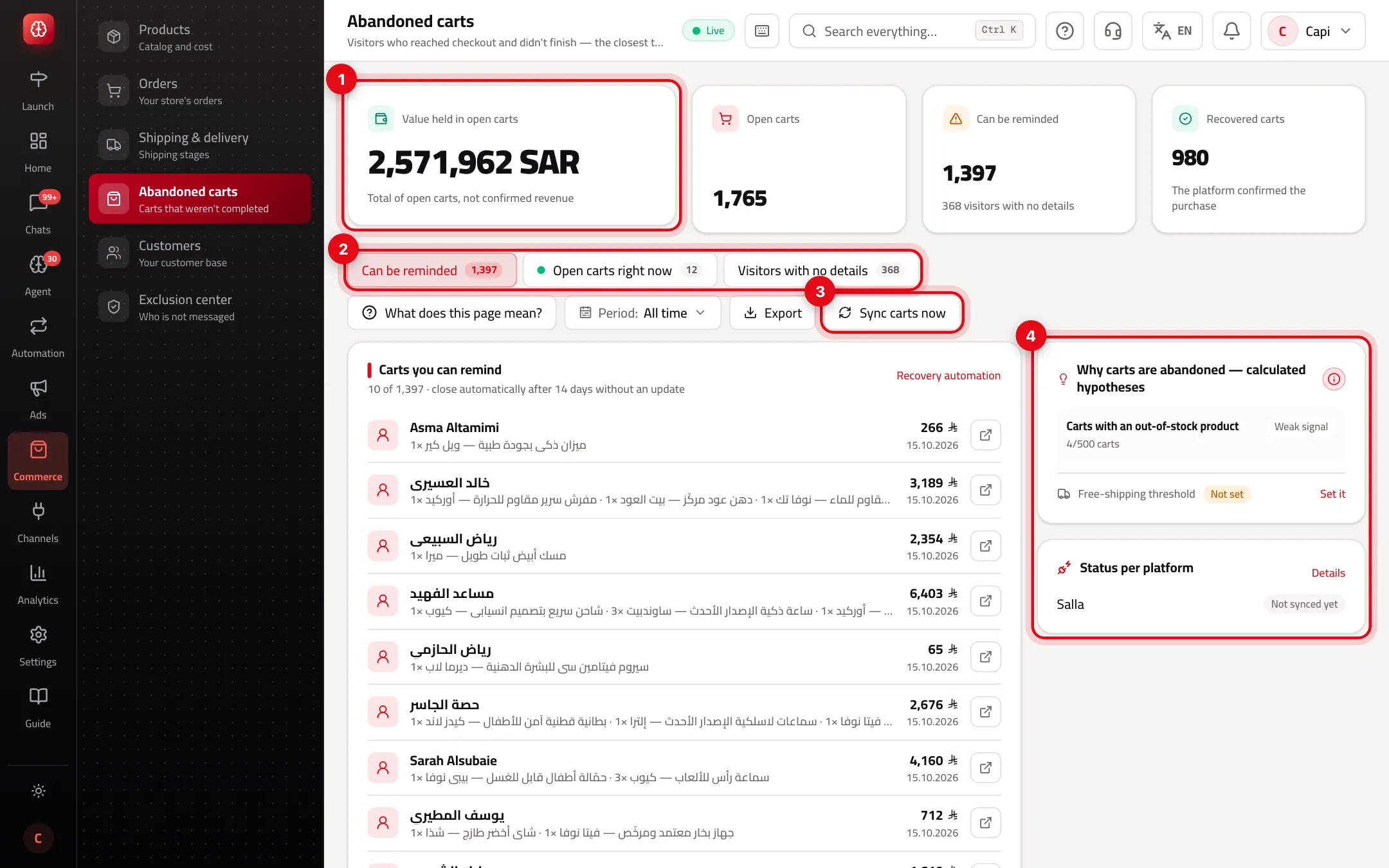
- 1“Value held in open carts”: the total of open carts, not confirmed revenue. Next to it: open carts, “Can be reminded”, and “Recovered carts” whose purchase the platform confirmed.
- 2The tabs: “Can be reminded” (carts linked to a customer with a number or email) and “Visitors with no details”. “Open carts right now” shows when your platform reports carts live; it's for viewing only.
- 3“Sync carts now”: reads carts right away instead of waiting for the next read.
- 4The side: “Why carts are abandoned — calculated hypotheses” and “Status per platform”.
A cart's life
| State | When | What happens |
|---|---|---|
| Open | The platform reported a cart whose payment didn't finish | Shows under “Can be reminded” if its owner has a number or email |
| Recovered | The platform confirmed the purchase | Counted in “Recovered carts” |
| Closed automatically | No update for 3 days (visitor with no details) or 14 days (known customer) | Leaves the open lists |
A “Visitor with no details” cart is kept because if the same visitor later enters their number at checkout, the cart updates and moves to “Can be reminded”.
Start recovering carts
- 1
Make sure carts arrive
Look at “Status per platform”. “Working” means reading works. “Needs action” or “Not synced yet”: press “Details” to see what's needed, and re-authorize your platform if asked.
- 2
Turn on the recovery automation
Press “Recovery automation” above the list. The automation sends the reminder to the cart's owner; this list shows who can be reached.
- 3
Set your free-shipping threshold
In the hypotheses panel press “Set it” next to “Free-shipping threshold”. Without it, “Carts below the free-shipping threshold are abandoned more” isn't calculated.
- 4
Read the hypotheses
From 20 carts up, Capi calculates likely reasons (shipping threshold, price, one product, out of stock, someone who abandons repeatedly) with the strength of each: strong, moderate, weak.
Best practices
- Start with the highest-value carts under “Can be reminded” — the open button next to each cart takes you to the customer.
- If “Carts with an out-of-stock product” shows a strong signal, the problem is stock, not the reminder.
- A “Weak signal” is evidence, not a verdict. Don't change prices on it alone.
Common mistakes and how to fix them
ProblemNo carts show at all.
FixOpen “Status per platform” → “Details”. Usually the platform needs permission to read carts: re-authorize it from “Stores & platforms” → the brand → “Connect platforms” → “Manage connection”.
ProblemThe sync log says the request was rejected because a permission is missing.
FixThe platform needs re-authorizing to grant cart access. Re-authorize, then press “Sync carts now”.
Problem“Value held” looks huge.
FixIt's the total of every open cart, not expected sales. The real recovered value is “Recovered carts”.
ProblemI can't save the free-shipping threshold.
FixIt needs permission to edit settings. Ask the account owner.
Screenshot from a demo store
Parts of the page
- 1
Value waiting
The total of open carts. Not confirmed revenue — what could be recovered.
- 2
Reachable
Carts linked to a customer with a number or email. These are the ones the “Abandoned cart” automation reaches.
Example40 open carts, 25 reachable: turn on the abandoned-cart automation to message them. - 3
Why carts are abandoned
Hypotheses calculated from your carts, such as shipping cost. Evidence, not a verdict, and none shows before enough carts.
- 4
Each platform's status
Where carts are actually read from, and what each platform that isn't read yet still needs.
Related articles
Didn't find your answer?