Commerce
Exclusion center
Who is not messaged
The exclusion center: who your messages don't reach, and why.
Open the page in the dashboardHow the exclusion center works
Here you see who doesn't get your marketing messages, and why. There are two reasons: a customer unsubscribed, or your team blocked them.
An unsubscribe the customer made themselves (wrote “STOP” on WhatsApp, or clicked the email unsubscribe link) is never undone from the dashboard. Only the customer's own consent brings them back. This protects you from complaints and from your number being banned.
Read the page
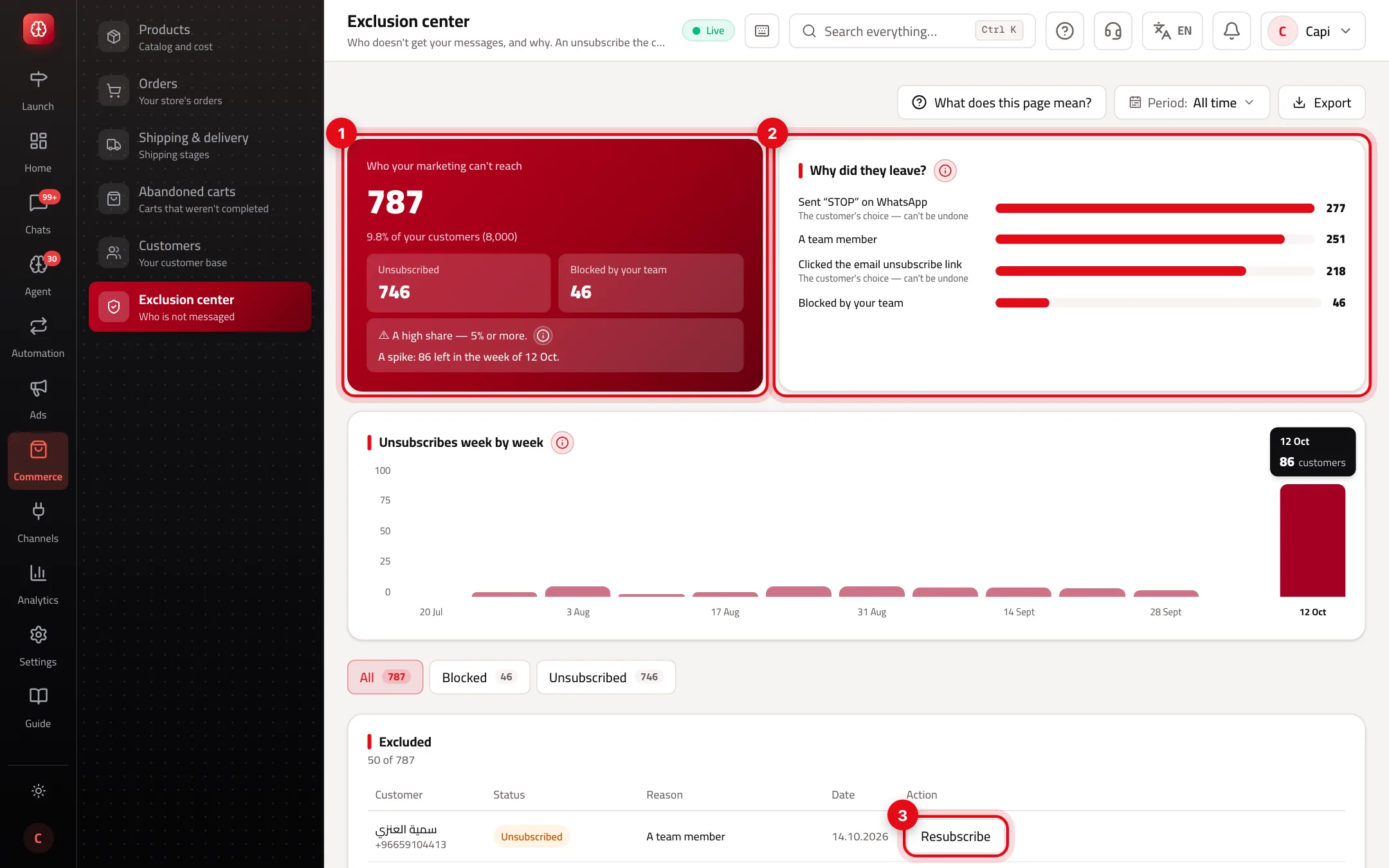
- 1How many are excluded and their share of your customers, split into “Unsubscribed” and “Blocked by your team”. Below it, a verdict on the share and a note when there's a spike.
- 2“Why did they leave?”: the reason behind each exclusion. Anything marked “The customer's choice — can't be undone” can't be brought back.
- 3The action next to each customer: “Resubscribe” or “Unblock” when it's allowed.
Exclusion reasons and what you can do
| Reason | Who decided | Can it be undone? |
|---|---|---|
| Sent “STOP” on WhatsApp | The customer | No |
| Clicked the email unsubscribe link | The customer | No |
| Unsubscribed in the chat or by SMS | The customer | No |
| A team member | Your team | Yes, “Resubscribe” |
| List import | Your team | Yes, “Resubscribe” |
| Blocked by your team | Your team | Yes, “Unblock” |
“A normal share” means under 5% of your customers; 5% or more is “A high share”. That's a common line in message marketing, not a number measured on your store. A spike is a week with at least 5 opt-outs and at least twice the usual week; Capi names the last campaign that reached them before they left.
Best practices
- Watch “Unsubscribes week by week” after every campaign. A column far above the rest means the campaign bothered customers.
- If the share rises, send fewer or better-targeted messages rather than trying to bring people back.
- Pick a “Period” to see opt-outs in one month. Blocks carry no date, so blocked customers only show under “All time”.
Common mistakes and how to fix them
ProblemA customer has no “Resubscribe” button.
FixThey unsubscribed themselves and can't be brought back from here. They return if they subscribe again themselves.
ProblemI want to exclude a customer.
FixBlocking isn't done on this page. Open “Customers”, tick them and press “Block”.
ProblemBlocked customers disappear after picking a period.
FixPick “All time” — blocks have no date.
Screenshot from a demo store
Parts of the page
- 1
Blocked and unsubscribed
Blocked means your team blocked them. Unsubscribed means they asked for it themselves, or your team recorded it.
- 2
Why can't I bring them back from here?
A customer who unsubscribed themselves comes back only with their own consent. That protects your number and your email reputation from reports.
ExampleA customer sent “Stop” on WhatsApp: no campaign reaches them until they subscribe again themselves.
Related articles
Didn't find your answer?